
Selah studio
Empowering others one digital product at a time!
From a full-time mom's heart to yours, offering practical solutions for everyday needs.
Art + design


digital product BLUEPRINT
A 14-Day Plan to Begin Developing and Marketing Your Digital Product

SELAH ART+DESIGN
WELCOME
Welcome and thank you for choosing this Digital Product Blueprint!
In today's digital age, the internet has unlocked countless opportunities for individuals to create and sell their products, making digital products particularly captivating and profitable.
Whether you're an aspiring entrepreneur seeking a side hustle, a person who's eager to reach a wider audience, or simply someone curious about the realm of digital products, this comprehensive guide caters to you.
If you're ready to embark on your digital product sales journey, I'm here to offer valuable tips, recommended tools, and top-notch products. While some online sources may make it seem like creating a planner on Canva and instantly making money online is a breeze, the reality is more intricate. On the other hand, lengthy guides can be overwhelming, leaving you unsure about the right path. Fear not, as I'll provide practical advice and streamlined tools to ensure your success.
Feeling less than creative or unsure where to begin with your digital product creation? No worries! Even as someone who is not a designer or professional content creator, I've discovered the concept of PLR (Private Label Rights). Later in this document, I'll explain it further and share the best websites offering ready-to-use digital products that truly sell.
So, if you're excited to dive into the dynamic world of digital products and explore boundless possibilities, you've arrived at the perfect destination. Together, let's embark on this enlightening journey to uncover what the future holds!
SELAH ART+DESIGN

MEET SELAH
In my quest to find the perfect career path,
I stumbled upon the world of digital products, literally an ebook—and it turned out to be an extraordinary journey! Not only did I begin generating additional income with this side hustle, but it also empowered me to craft the life of my dreams on my own terms. Let me share all the step-by-step guide on how you can also get started.
SELAH ART+DESIGN

CONTENTS
DAY 1 - FINDING YOUR NICHE
DAY 2 - WHAT PROBLEM TO SOLVE
DAY 3 - CREATING YOUR BUSINESS NAME
DAY 4 - CREATING YOUR PRODUCT
DAY 5 - NAMING + PRICING YOUR PRODUCT DAY 6 - CHECKING YOUR COMPETITION
DAY 7 - DOMAINS & WEBSITE
DAY 8 - MARKETING TIPS
DAY 9 - EMAIL MARKETING
DAY 10 - OTHER PLATFORMS WHERE TO SELL DAY 11 - ETSY SELLER GUIDE
DAY 12 - GOAL SETTING
DAY 13 - LAUNCHING DAY
DAY 14 - CELEBRATE YOUR SUCCESS!

SELAH ART+DESIGN

WHAT ARE DIGITAL PRODUCTS
Have you ever bought or used something online, like an eBook or an online course? These are examples of digital products. Digital products are things that exist only in the digital world, not as physical items you can touch. They are created and distributed electronically, so anyone with internet access can buy and use them. It's pretty awesome, right?
The best part is that digital products can be fun or educational. You can learn something new or simply enjoy your leisure time with them. They offer a wide range of options to cater to your interests.
The rise of digital products has created exciting opportunities for creators, entrepreneurs, and consumers. Creators can share their expertise and creativity with people worldwide, without worrying about physical production and distribution. Entrepreneurs can use digital marketing and e-commerce to start and grow their businesses with fewer costs and more flexibility. And for consumers, it means having access to a vast selection of high-quality products and services that suit their individual preferences and needs.
SELAH ART+DESIGN
DAY
01
FINDING YOUR NICHE
SELAH ART+DESIGN

01
HOW TO FIND YOUR NICHE
If you don't know where to start and what niche should you focus on, there is a tool that you can use to check the profitability of the topic.
First, visit the WordStream keyword search tool HERE

You're going to type in some words that are connected to the topics you're thinking about for your digital product. These are like special words that remind you of the things you want to create. After you type them, remember to save them on your phone in a special note. That way, you can easily remember what you searched for and the things you found. It's like having a little list of important words to help you with your project!
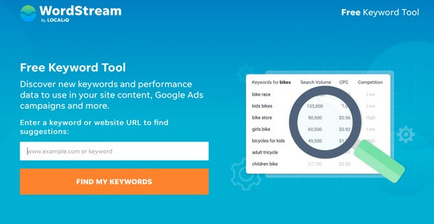

This tool will tell you how many people are looking for your specific topic or word this month. Let's see an example. I teach people how to start in affiliate marketing, and here are the results.
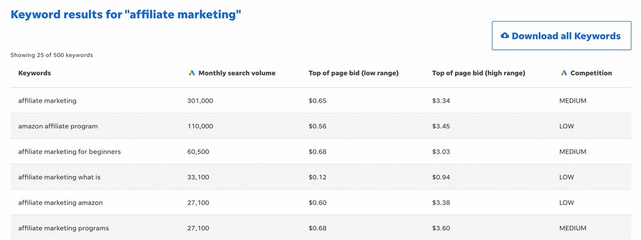
Important points to remember: When creating your digital product, choose keywords and a specific area of interest that have more than 25,000 searches every month. It will be challenging to find potential customers if the search volume is lower. Also, if you select a very narrow niche, try to come up with alternative ways to describe your product to increase search visibility. Keep a record of your keywords and the number of searches they receive in your notes folder.
DAY
02
WHAT PROBLEM TO SOLVE
SELAH ART+DESIGN
02
WHAT PROBLEM TO SOLVE
FINDING A PROBLEM TO SOLVE = MONEY
Now that you know your specific area of interest, it's time to do some research and find out what issues your target audience needs help with. If you have no idea about the questions and problems your audience is facing, don't worry. You can explore public forums to discover their needs.
Here are some of my favorite websites to use: - Answerthepublic.com
- Reddit.com
- Quora.com

You should search for the keywords related to your niche and save the questions people are asking in those areas. These questions will help you identify the problems your digital product should address. Keep it simple, don't try to tackle multiple problems with your first product. Focus on solving one problem.
PRO TIP: Save the other problems you discover for your second digital product.
DAY
03
CREATING YOUR BUSINESS NAME
SELAH ART+DESIGN
03
CREATING YOUR BUSINESS NAME
If you already have a business or brand, you can skip this step if you plan to sell your digital product within that existing business.
But, if you are starting from scratch, it's time to choose a name for your new business! When picking a business name, think about the long-term. For instance, I enjoy being into a slow living journey while building a digital business so I named my business as Chill Entrepreneur.
If you decide not to use your own name, consider using keywords that people might search for when looking for your type of business. A good guideline is to keep the name clear and straightforward. While clever names can be fun, they may not be easy to remember or understand for people.
You can also include your name in the business name, such as "RSCN Creative" or "Side Hustle Bestie"
Ensure that the name you choose is memorable. Ask your friends and family for advice when deciding on a name. See how people respond to it.
Don't overthink this process. Choose a simple business name that immediately conveys what you do. Avoid being overly specific, as it might confuse people who are not familiar with industry jargon or terms.
03
BRANDING + COLORS

You can start choosing what brand colors would you like to have for your business.

Canva offers many free templates for this purpose if you search for "brand kit." Once you've made your brand kit, add your chosen colors and fonts to it in Canva.
DAY
04
CREATING YOUR PRODUCT
SELAH ART+DESIGN
04
CREATING YOUR PRODUCT
It's time to start creating your digital product. Here's a simple way to get started:
1. Use sticky notes to jot down all the points you want to include in your product.
2. Arrange the sticky notes in a logical order on the wall.
3. Once you have an outline, write a little bit every day to develop your product.
4. When you're finished, have a friend review it for typos and mistakes.
5. Avoid making it look fancy until you have the content ready.
6. Now, start working on your product!
Always remember that every process doesn't have to be complicated. Make it simple and easy to do.
04
CREATING YOUR PRODUCT
WHAT KIND OF PRODUCT TO SELL?
There are many different types of digital products you can sell, but starting with an Ebook (a PDF guide explaining something) is a good way to begin. It doesn't have to be long; even a 15-page solution to a problem is great!
Other options include:
- Templates, Journals (you can easily create this on Canva)
- Presets (especially popular for photographers)
- Subscriptions (like trending reel subscriptions or daily prompts)
- Mini video courses
- Google Sheets templates
Basically, anything you use in your business or with your current clients that can be turned into a digital product would be a great choice to start with.

04
WHERE TO CREATE
I love creating digital products in two places: Canva and Google Sheets.
Canva is perfect for making E-books, how-to guides, and templates specific to Canva.
Google Sheets works well if you want to sell a template that you already use in your business and your audience will find helpful.
If you're on a tight budget, you can use the free version of Canva. Once you're done creating your guide or E-book, simply export it as a PDF and sell it.
A useful tip: I prefer selling PDFs by uploading them to Google Drive and sharing the link with buyers. This way, I can update the PDF with any changes or additions without having to resend it to previous purchasers.
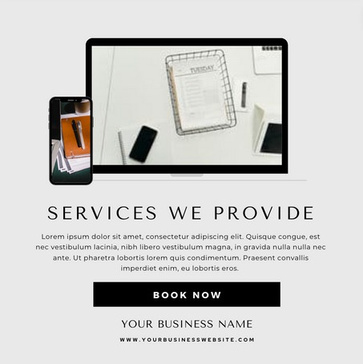
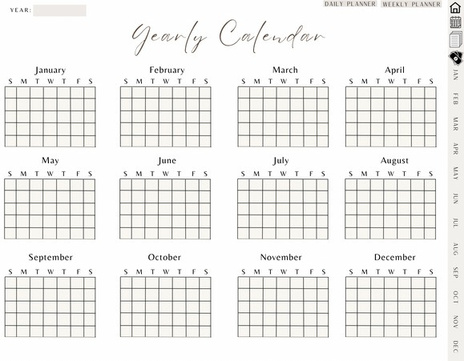
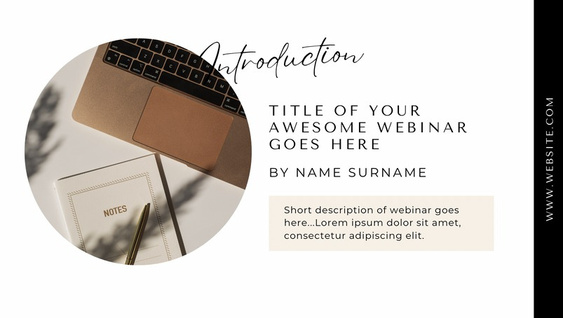
BONUS!
FREE TEMPLATES
THAT YOU CAN
CUSTOMIZE AND
RESELL








DAY
05
NAMING + PRICING YOUR PRODUCT
SELAH ART+DESIGN
05
NAMING YOUR PRODUCT
Choosing the right name for your product is incredibly important. You want a name that is attractive and easy to understand. If people are confused about what your product offers, they might not buy it.
Always prioritize clarity over being cute or clever when naming your product. For instance, if your digital products are designed for beginners, using names like "starter kits" will make it clear to potential buyers that these resources are perfect for them.
Incorporate helpful words like "Guide," "How-to," "101," "Ultimate," "Proven Framework," and "30 days" (time frames) to enhance the appeal of your product names.
Here's an example to illustrate the difference: A digital product name that won't make sales: "My favorite diet meal plan"
A digital product name that WILL make sales: "12 weeks to your beach body ready."
Make sure your product name hooks potential buyers in and communicates its benefits effectively.
05
PRICING YOUR PRODUCT
Setting the right price for your product is crucial, especially if you plan to add more products in the future. You want to find a balance between allowing room for future price increases while keeping the prices affordable.
The key is to offer a product value that greatly surpasses its price. You want customers to feel like they're getting an amazing deal, like they've won the lottery, which will encourage them to come back for more.
For products that are easy "no-brainer" purchases, it's best to keep their prices under $100. For example, $27, $37, $47, and $97 are good price points.
Or if you want to sell in Philippine peso like what I'm doing, prices can be from 999, 1,299, 1499, 2499.
05
PRICING YOUR PRODUCT
If you start with a lower-priced offer, like P99, make sure to plan for a higher-priced offer in the future, such as P5,000 and ensure that the value matches the price tag.
When deciding on prices, consider how many units you need to sell to reach your income goal. For instance, if you want to make P30,000 per month, you would need to sell:
- 60 products at P499 (approximately 2 sales a day) - 30 products at P999 (approximately 1 sale a day)
DAY
06
CHECKING YOUR COMPETITION
SELAH ART+DESIGN
06
CHECKING YOUR COMPETITION
The reason I suggest waiting to spy on your competition is that it's much easier to copy their ideas once you see everything they offer. Instead, focus on developing your product first and then use this research to strengthen your ideas or make adjustments.
To understand what others in your industry are selling, check out their products and see what they are lacking. Find ways to fill a gap in the market with your own product.
For instance, when I began teaching people how to start in affiliate marketing, all the existing options were only several videos on Youtube and no exact guide on how people can get started. So, I recognized the need for a more affordable offering in this market.
06
CHECKING YOUR COMPETITION
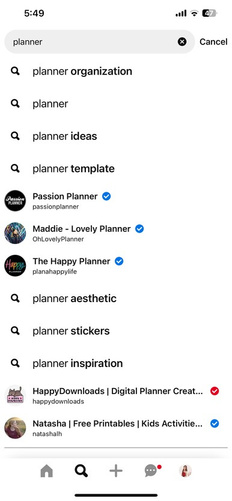
To conduct this research, use social media, and Etsy. Remember the keywords you researched? Utilize them to search on different social media platforms and Etsy and see what recommendations come up as you type.
Pay close attention to the auto-populated suggestions when searching your keywords and keep track of your findings.
DAY
07
DOMAIN + WEBSITE
SELAH ART+DESIGN
07
DOMAIN + EMAIL
Now it's time to get your domain and a professional email. This is important for managing your email list later on, so don't skip this step.
I always buy my domain at google domains.
For your domain, it's best to choose something close to your business name. Remember, simple and easy-to- remember domain names are always better.
Once you have your domain, you should get an email address that uses your domain at the end.
I recommend using G-suite for this. For instance, my email address is hello@chillentrepreneur.com, but you can also have yourname@yourdomain.com. Additionally, with G-suite, you can create alias email addresses like support@yourdomainname.com for customer support.
07
WEBSITE
To set up your own website where you want to sell your digital products, you can try to sell on STAN STORE.


If you don't want to create your own website, it's still fine. Scroll through on this ebook and you will see more platform recommendations that you can use.
DAY
08
MARKETING TIPS
SELAH ART+DESIGN
08
MARKETING TIPS
Social media is great, but most people don't use it effectively to reach more people and sell to them. Today will be a relaxed day before we dive into the details. First, let's talk about three free marketing platforms: TikTok, Instagram, and Pinterest.
TikTok and Pinterest are places where you can connect with many potential buyers. They are outreach platforms.
Instagram, on the other hand, is where you can build relationships and sell to your audience. It's your nurture platform.
The best strategy is to use all three platforms together to sell your digital product. Don't worry if managing three platforms seems overwhelming. It's not as scary as it seems!
Keep in mind that Pinterest requires patience and a long-term approach. So, focus on Instagram and TikTok first!
08
INSTAGRAM TIPS
A year ago, I thought Instagram was no longer useful. But then I realized I was using it incorrectly. Now, I see Instagram as a platform where I connect and build trust with my audience through my stories. Instead of just creating content, I focus on telling stories from the perspective of my business. Sharing moments from my day helps people know me better and feel more connected to me. Everything I post in my stories has a purpose and relates to the value I offer.
To engage with your audience, use things like polls and sliding bars. Respond to their stories and comments. This is how you nurture your followers on Instagram.
Regarding content, I mainly post reels on IG. You can repurpose your TikTok videos as reels for Instagram and vice versa.
08
INSTAGRAM TIPS
Here are some creators that I like to follow on Instagram:
@REBELLENUTRITION - she's very good at selling her offer thru stories.

@STORYTALE - this account also sells a mini course and her content is purely educational carousel posts but still she is making good sales from her offer.

@INSTAWITHANNALISE - her Instagram growth tips are always on point!

08
TIKTOK TIPS
Personally, I'm not totally a fan of TikTok, just giving you an overview of what you can also do on this platform.
TikTok has an incredible reach these days, meaning you can connect with many people. However, if you want to sell something on TikTok, you need to be smart about it. TikTok users are open to buying low-priced offers like yours, but they don't want to feel like they're being sold to.
Before we discuss the content you should create, let's go over some basics. If you already have a personal TikTok account for casual use, don't use it for your business. Instead, start a fresh account so the algorithm can learn how to categorize your content quickly. Start the new account only when you're ready to begin posting.
08
TIKTOK TIPS
Make sure to create your new TikTok account as a personal one to access all the music options. Business accounts tend to reach fewer people and have limited access to the music library. It's a good idea to keep your TikTok name the same as your Instagram name for consistency.
Your initial goal on TikTok should be to reach 1,000 followers. Once you hit this milestone, you'll be able to add a link to your TikTok account.
What should you post on TikTok? TikTok is currently giving a lot of attention to storytelling content where you talk directly to the camera or use voiceovers. It's not just about following trends anymore. People on TikTok are looking for a deeper connection through storytelling. Also, using Capcut templates is a popular trend on TikTok right now. If you can use them effectively for your specific interests, it can be beneficial. Whenever TikTok introduces a new feature, they promote it heavily, so make sure to make the most of those opportunities!
08
TIKTOK TIPS
Make sure to create your new TikTok account as a personal one to access all the music options. Business accounts tend to reach fewer people and have limited access to the music library. It's a good idea to keep your TikTok name the same as your Instagram name for consistency.
Your initial goal on TikTok should be to reach 1,000 followers. Once you hit this milestone, you'll be able to add a link to your TikTok account.
What should you post on TikTok? TikTok is currently giving a lot of attention to storytelling content where you talk directly to the camera or use voiceovers. It's not just about following trends anymore. People on TikTok are looking for a deeper connection through storytelling. Also, using Capcut templates is a popular trend on TikTok right now. If you can use them effectively for your specific interests, it can be beneficial. Whenever TikTok introduces a new feature, they promote it heavily, so make sure to make the most of those opportunities!
08
TIKTOK TIPS
Make sure you create a personal TikTok account to have access to all the music. Business accounts reach fewer people and have limited music options.
I suggest keeping the same username on TikTok as your Instagram account (that you'll use for this business) for consistency.
Your first goal on TikTok should be getting 1,000 followers. Once you reach that milestone, you can add a link to your TikTok account.
Keep in mind that when you share videos on TikTok, most of the viewers won't know you or your content. So, don't assume they have seen your previous videos.
Start by creating your TikTok account and posting different types of content to see how people respond. Then, continue making the content that viewers enjoy the most!
08
PINTEREST TIPS
Pinterest is a long-term game, but you can start sharing your Instagram videos on Pinterest without much extra effort. Idea pins on Pinterest are getting more attention than regular pins, so it's a good opportunity to make the most of it. Here's how to get started with Pinterest:
1. Find relevant keywords by searching for terms that describe your content on Pinterest. Take note of these words on your phone.
2. Convert your Pinterest account into a business account or create one if you don't have it. If you have a website, claim it on Pinterest.
3. Use the same profile picture across all your platforms, including Pinterest, Instagram, and TikTok.
4. Write your profile using the keywords you found earlier and include a Call-to-Action (CTA) at the end.
5. Follow accounts that are related to your niche or content.
08
PINTEREST TIPS
6. Create 10-15 boards based on your chosen keywords. Make sure the board names are simple and easy to find.
7. Use plenty of keywords in your board descriptions to improve your searchability. This helps Pinterest understand who to show these pins to.
8. Start posting on Pinterest EVERY DAY, even if it's just one idea pin to begin with. As you get comfortable, aim for 10-15 pins a day.
Don't worry about feeling overwhelmed; you can create multiple pins for the same content by changing the image and title.
This means one piece of content can become 5-10 different pins. To save time, consider using a tool like Tailwind to schedule your pins. With about an hour per week, you can create all your pins for the week.
08
CREATING PRODUCT DESCRIPTION
Here's a simple template that you can use in writing the description for your digital product.
We know you have certain challenges and needs (mention what they are), and if you ignore them, you might miss out on something crucial. That's why we dedicated a lot of time (mention the time spent) to developing the perfect solution for you.
With our product, you can finally enjoy (mention the benefits they'll get) and (mention one more benefit), all without worrying about (mention the other problem). Say goodbye to those worries!
Features of our product include (list the technical specifications, warranty, applications they can use).
Take action now and get this product to start experiencing the amazing benefits it offers. You won't regret it, we promise!
As a helpful tip, consider using AI websites to create high-quality product descriptions that grab attention. You can use the following prompts for ChatGPT:
1. Highlight the top three benefits of your product and explain how they improve the customer's experience.
2. Emphasize the solutions your product provides to specific problems or challenges faced by users, showcasing its value.
3. Appeal to potential customers' emotions and aspirations by describing the emotional or lifestyle benefits associated with your product.
DAY
09
EMAIL MARKETING
SELAH ART+DESIGN
09
EMAIL MARKETING
Email marketing is literally the only way you can "own" your audience. If your social media accounts disappeared tomorrow, would you have a way to reach your community?
That is why you need an email list. I only recommend one platform, because it has everything you need, AND it is very affordable. A lot of other email providers charge more money when your email list grows, but my go-to, Flodesk, only charges a one-time monthly fee.
You can also have the option to use the email feature inside the systeme.io for the free version.
09
CREATING YOUR FREEBIE
LEAD MAGNET = A FREEBIE
A lead magnet is a free item or giveaway that you offer to people in exchange for them joining your email list. For instance, the freebie I use to encourage people to join my email list is THIS.
What makes a good freebie? Your freebie should be directly related to your digital product. It should provide people with a small accomplishment or benefit while leaving them eager for more from you. I suggest starting with something you can share as a PDF on Google Drive. This way, you can update it as needed and keep the content current by uploading the latest version to your Google Drive file.
For instance, the freebie I made for the Digital Product Starter Kit was a list of 100 digital product ideas. It prompted you to think about and get excited about specific digital product ideas you can create. At the same time, it made you feel like you needed further guidance on how to actually create and sell them.
Today, your task is to create your own freebie!
09
CREATING OPT-IN FORM
After creating your freebie, you can save it as a PDF. If you plan to make updates later, it's best to upload the PDF to your Google Drive and share the link. This way, you can provide improved versions anytime.



DAY
10
OTHER PLATFFORMS WHERE TO SELL
SELAH ART+DESIGN
10
OTHER PLATFORMS WHERE TO SELL
It's essential to understand that every platform has its own pros and cons. So, before you choose one for your business, it's crucial to think about the features, pricing, and how well it can work with other tools. To make this easier for you, we've put together a list of the top eCommerce platforms that are great for selling digital products on the internet.
Creative Market is a website where you can sell graphics, fonts, photos, and more. There are no fees to set up your store, but they take 40% of each sale as a transaction fee.
Gumroad is another popular website to sell digital products like ebooks and software. They charge a 10% plus $0.30 fee for each sale on their Free plan.
Podia is a website designed for selling digital goods like courses. They offer a 14-day free trial, and their pricing starts at $39 or $79 per month. They also have a free plan with an 8% fee.
Payhip is a platform where you can sell various digital products, and they have different plans. The Free plan charges a 5% transaction fee, which is reduced to 2% on the Plus plan. The Pro plan has no transaction fees.
As for me, I'm using system.io as for my website (free) and my customers can have the option to pay via PayPal or direct deposit on banks.
DAY
11
ETSY SELLER GUIDE
SELAH ART+DESIGN
11
ETSY SELLER GUIDE
We all know that Etsy is not the only option available, but there are many good reasons to give it a try. Here are some of the reasons why you might want to sell on this platform.

Lots of Customers: Etsy has almost 90 million active buyers from around the world. It's a popular place for people looking for unique handmade, vintage, digital, and customized items. If you're just starting as a seller and don't have a big following, Etsy can be a great place to start.

Easy to Use: Etsy is user-friendly and doesn't require any coding or design skills. You can set up your shop quickly, unlike other online marketplaces that take a lot of time and effort. Creating new shops and product listings is simple on Etsy.

Low Seller Fees: Selling on Etsy is not very expensive. It costs $0.20 to list an item, and the listing lasts for four months. If your item doesn't sell and you want to keep it listed, you'll be charged an additional $0.20. When an item sells, Etsy takes a 6.5% commission on the sale price.
11
ETSY SELLER GUIDE
There's also a payment processing fee of 3% + $0.25 (for US-based sellers). You can use the website Etsycheck.com and its "Profit Calculator" feature to calculate fees based on your country. There are different subscription plans with useful Etsy tools.
11
SETTING UP ETSY
Guide for Etsy Sellers: How to Start Your Etsy Shop?
1. Go to Etsy.com and click on "Sell on Etsy."
2. Choose "Open Your Etsy Shop" from the options provided.
3. Select your shop's language, country, and currency.
4. Now, pick a unique and appropriate shop name with 4-20 characters. Avoid special characters, profanity, or using someone else's name or trademark.
5. Add your product listings with necessary details like photos, title, category, description, tags, price, and quantity. For digital downloads, you can use 999 as the quantity.
6. Provide your personal information on the "How You'll Get Paid" page, including connecting your bank account to your Etsy shop to receive payments from sales.
7. Set up billing by adding your credit or debit card for Etsy's fee collection.
11
SETTING UP ETSY
8. For security, set up two-factor authentication, which requires a verification code when signing in from an unrecognized browser or device. You can receive the code through an authenticator app on your Android or iOS device or via SMS or a phone call.
9. After completing all these steps, select "Open Your Shop," and congratulations! You're now ready to set up your shop and list your products.
Before you do anything else, make sure to fill in all the important information in your Etsy shop. This includes the Shop Title, Shop Announcement, Message to Buyers, Story Headline, Your Story, Shop Video, Shop Photos, links to your social media and websites, policy details, welcome message, payment and shipping policies, privacy policy, additional information, and frequently asked questions. Add as many details as possible to improve your Etsy shop.
11
ETSY TIPS
For Etsy SEO:
1. Use the same keywords and tags in your product title as they appear in Etsy search to improve your chances of showing up in search results.
2. Include your product title in the product description.
3. When naming shop sections, prioritize using keywords over using cute or fancy names.
4. If relevant, use the "Attributes" feature for your listings to avoid being excluded from Etsy's search results filter. Also, use the "Color," "Occasion," and "Holiday" features if they apply to your products.
5. If your listings are not performing well, revise their titles and tags. But, don't edit listings that are already selling well, as it could reduce their visibility and affect your sales.
11
ETSY TIPS
When using keywords for your Etsy shop, remember to include relevant words in various places like your shop profile, announcements, sections, and product descriptions.
In your product titles, avoid using overly general keywords like "digital planner." Instead, try using more specific phrases known as "long-tail keywords." For example, if you sell a digital planner, you can use specific long-tail keywords like "ADHD Digital Planner," "Customizable Digital Planner for GoodNotes," "Notability Digital Planner," "Floral-Themed Digital Planner," "Interactive Digital Planner with Hyperlinks," and "Minimalist Digital Planner for Digital Organization."
You can use third-party apps like Everbee, Etsycheck, and Erank to help improve your keywords, but Etsy itself also provides search term suggestions. Just start typing a term in the search field, and the drop-down suggestions will display common keywords for that search.
11
ETSY TIPS | KEYWORDS
Additionally, utilize the specific keywords that Etsy provides for your shop. Access them through the seller dashboard by clicking on the Stats tab, select "Etsy search," and scroll down to review the search terms used by your shop visitors.
When it comes to Etsy tags, using broader tags will get your shop more views, but it may not result in as many clicks and sales. Etsy's algorithm prioritizes searches that lead to clicks and purchases. It's best to use a mix of general and specific tags.
To find successful sellers on Etsy, check out their listings and see what tags and keywords they are using. You can try using some of these in your own product listings.
PRO TIP:

Do you know that Etsy's search system, called "Etsy Relevance," considers how new the listings are? So, if you keep adding new items to your shop regularly, it can help your shop appear higher in search results. Therefore, keeping your inventory fresh by adding new products can improve your shop's visibility on Etsy.
11
ETSY TIPS | LISTING PHOTOS
When you post pictures of your products on Etsy, use good quality and well-lit photos. Avoid using hard-to-read colors and fonts. Try to use all 10 photo slots to make your listings better. You can use two photos for showing "How it Works" and that it's a digital download.
One of your photos can be used for promoting a sale, inviting people to visit your shop, or showing important details about your product. Some customers don't read descriptions and only buy products based on the images.
To get more visibility on Etsy, regularly add new product listings. Etsy likes it when sellers offer fresh and updated items, so they reward you with better search results.
When creating new listings, you can use the tags, title, and description that worked well for your best-selling product. Also, consider making new products related to your top sellers.
Whenever someone clicks on your listing and buys something, it improves the "Quality Score" for that listing. Etsy notices this and gives it higher priority in search results. If you're getting lots of visits but no sales, review your listing to make sure it's capturing customer interest effectively.
11
ETSY TIPS | MARKETING
When it comes to marketing your products:
1. Use discount coupon codes like "Thank You," "Abandoned Cart," and "Favorited Item" to reward previous buyers and potential customers who have shown interest in your products. These discounts will encourage them to buy from you again and boost your sales.
2. If your budget allows, consider renewing some of your listings on Etsy every week for 20 cents each. This will make your items appear at the top of the search results as if they were new listings.
3. If you can afford it, think about investing in Etsy ads. You can start with as little as $1 per day and increase up to $25 per day. However, it's best to keep it around $3 to $4 per day to avoid overspending. Be cautious with higher amounts, as your listings might be advertised externally (Offsite Ads), which can quickly consume your daily ad budget without much benefit.
11
ETSY TIPS | MARKETING
4. Utilize Pinterest to promote your Etsy shop or website and attract more visitors. It's a free platform where you can regularly share your listings, and unlike social media posts that disappear after 24 hours, pins on Pinterest have a longer lifespan, providing ongoing visibility for your products.
5. Focus on one or two marketing platforms that you are already familiar with and dedicate your efforts to those. Your time is valuable, and while marketing is important, it shouldn't take up the majority of your time. Stick to platforms that you can effectively manage while still having enough time to develop and create products for your Etsy shop.
DAY
12
GOAL SETTING
SELAH ART+DESIGN
12
GOAL SETTING
Goals are really important. Don't skip this part. Setting goals is essential.
I want you to write down what you want to achieve in 30 days, 60 days, and 90 days. Be clear and specific. Aim high for your income goals.
In my first month selling digital products, I set a high goal and worked every day to reach it, and I succeeded.
In the second month, I didn't set any goals because I just came back from my vacation and didn't have time to focus for a while.
But in the third month, I set a big goal and even increased it three times because I kept achieving my goals early.
When you have a specific goal, you will do whatever it takes to achieve it. So set clear and specific goals!
DAY
13
launching
SELAH ART+DESIGN

13
LET'S LAUNCH YOUR PRODUCT!
Launching your product can be overwhelming, but don't worry, you can do it.
First, add your website link to your Instagram bio and share it excitedly in your stories. It's okay to feel nervous, that's normal. Now comes the fun part—talk about your product on social media every day.
Share the process of creating your product and tell your story. It might take about 7 times before someone decides to buy from you, so don't worry if sales are slow at first. Keep sharing even if you feel tired of it. That's normal, but it's essential to keep going.
The key to making sales is focusing on the benefits of your product, not just its features.
By the way, this helpful video explains various ways to market your digital product. It's really good!

13
GETTING TESTIMONIALS
Testimonials are a big factor in convincing people to buy! I've tried posting stories with and without testimonials, and I always make more sales when I include them. It's always the case!
And the best testimonials are simple screenshots of messages people send me when they achieve success with my starter kits. I ask for permission before sharing and strategically post them in my stories.
Here are some ways to use testimonials to increase sales:
1. Share them in your stories with a story about the client or the results first.
2. Include them in your reels (short videos).
3. Add them at the end of your emails.
Remember, facts are essential, but stories are what really sell. So, when you share testimonials, make sure to tell a story that gets people excited and builds up the excitement.
DAY
14
CELEBRATE YOUR SUCCESS!
SELAH ART+DESIGN
14
CELEBRATE YOUR SUCCESS!
This is the day to celebrate! Be happy and proud of yourself!
Because you made and launched your very first digital product! It's a big achievement, and it's only the start. Once you realize the possibilities of selling digital products, I have a feeling you won't want to stop.
Message me on Instagram when you've launched your product. I'd love to
share it in my stories and support you!

STILL NOT SURE WHERE TO START?
YOU CAN TRY SELLING
PLR PRODUCTS
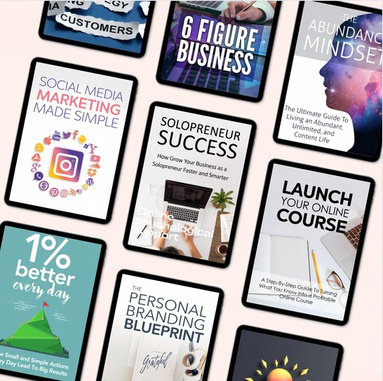
DONE FOR YOU READY TO SELL DIGITAL PRODUCTS
WHAT ARE PLR PRODUCTS?
Private Label Rights (PLR) products give you a lot of freedom if you buy them. Here are some things you can do with PLR products:
1. Sell the product to make money.
2. Change and customize the product to make it your own.
3. Claim ownership of the product and use it as your own creation.
4. Combine the product with other something unique.
things
to make
5. Print and publish the product in physical formats.
6. Add the product to paid membership sites to make them more valuable.
Remember to carefully read the license agreement before using a PLR product. If you're interested in exploring PLR products, check out the websites below for various options.
PLR WEBSITES YOU CAN CHECK
- PLR.ME
- When you join PLR.ME, they give you 10 credits for free. They have articles, eBooks, and courses that focus on helping you improve yourself.

- PLRDATABASE.NET
- They have important PLR products articles, videos, scripts, and more.

like eBooks,
software,
- YOURSECRETWEAPONPLR
- This offers membership program where you can access PLR Journal Canva Templates, Worksheets, Digital Planners, and coaching templates.

- THEHAPPYJOURNALS
- Here you can find planners, journals, templates, printables, digital notebooks, and other items that help with motivation, happiness, spirituality, and positivity.

- BIGPRODUCTSTORE
- It provides a range of PLR (Private Label Rights) products, like eBooks, articles, software, and graphics, covering various topics.

- CONTENTSPARKS
- They specializes in digital products for online learning, such as online courses, slideshows, assessments, and action guides.

Private Label Rights products are like ready- made items that businesses and individuals can sell as their own to save time instead of creating everything from scratch.
But, just selling these products as they are might not lead to great success because many others might be doing the same thing.
To really succeed, it's important to customize and make the product unique, so it stands out from what others are offering.
With some work and creativity, these products can be a fantastic way to help your business or brand grow.
Thank You!
I really appreciate you dedicating your time and effort to use this starter kit. I'm proud of you for trying something new! Best of luck, and please keep me updated on your progress.
I love receiving direct messages with your success stories!
SELAH ART+DESIGN